
This report displays all the individual students their learning outcomes, based on the classes they’ve attended.
1. Go to Main Menu select Education then Reports select Progress Hours 2
2. Filter by Reporting Year.
3. Select Toggle enrolments to view individual enrolments within the subject unit.
4. Select the Print
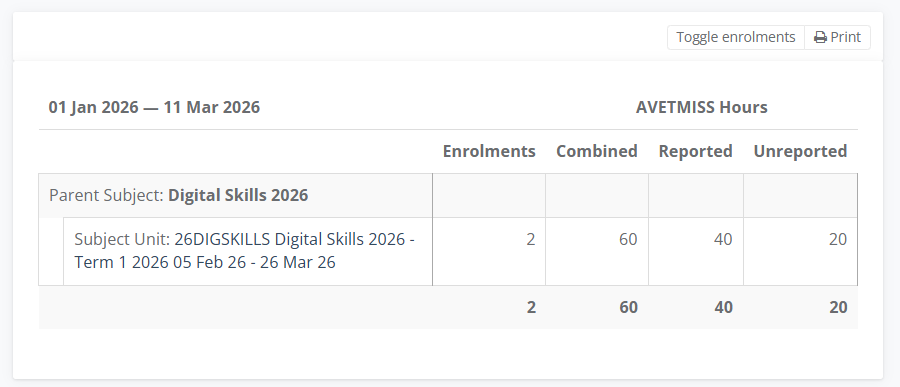
The default table displays
- Parent Subject – the name that groups subject units together
- Subject Unit – the VET code, class name and time period
- Enrolments – number of enrolments that are reported
- Combined – the number of enrolment hours
- Reported – the number of enrolments included in the AVETMISS report
- Unreported – the number of enrolment hours not included in the AVETMISS report.
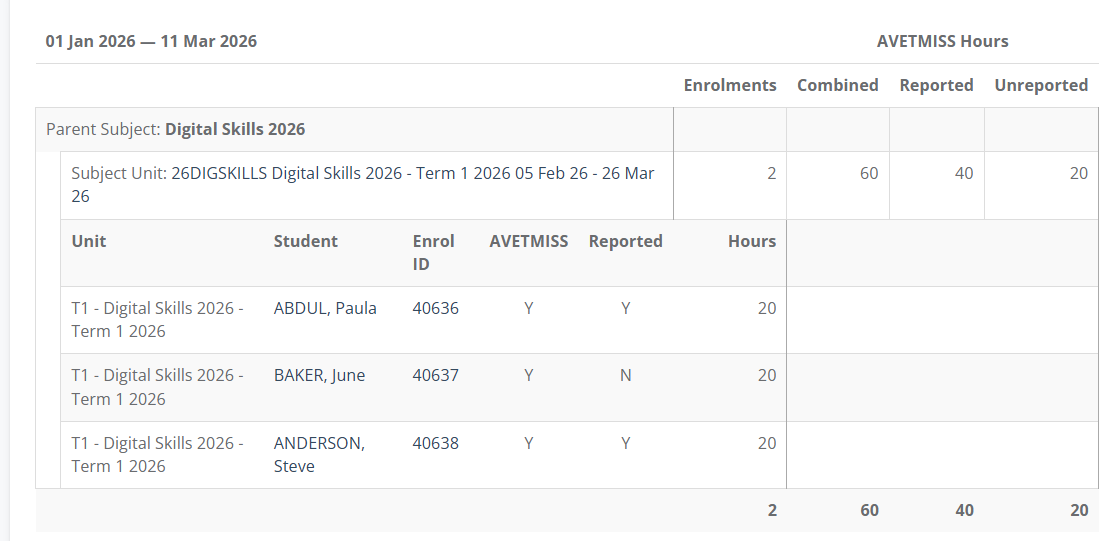
The enrolment table displays
- Parent Subject – the name that groups subject units together
- Subject Unit – the VET code, class name and time period
- Unit - course name
- Student – individual names of students based on their enrolment
- Enrol ID – the unique enrolment ID
- AVETMISS – included in the AVETMISS report
- Reported – Y / N
- Hours - Scheduled Hours for the Class